Ingest policies
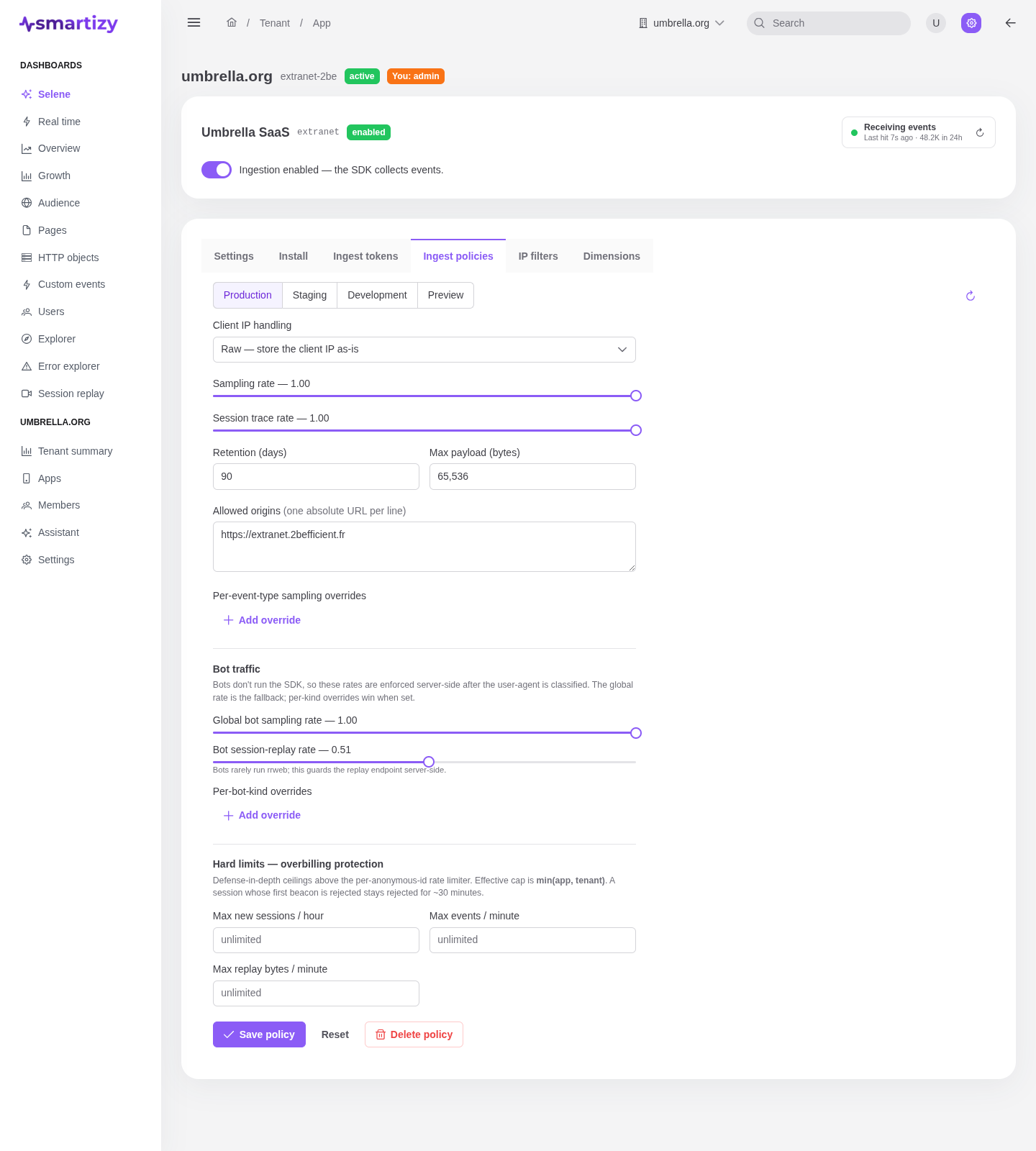
An ingest policy is the per-environment ruleset the receiver applies to incoming beacons: how much to keep, how to handle IPs, which origins to accept, how to treat bots, and where to draw hard ceilings. It is how you control volume and cost without changing the SDK.
Per environment #
Each app holds one policy per environment: production, staging, development, and preview. Open the app's Policies tab, pick an environment with the selector, edit the fields, and save. You need the Admin role to change a policy.
Collection & shaping #
| Field | What it controls | Default |
|---|---|---|
| Sampling rate | The fraction of traffic kept, from 0 to 1. Lower it to cut volume on noisy environments. | 1.0 |
| Session trace rate | The fraction of sessions captured for always-on session replay, from 0 to 1. Only takes effect when replay is enabled on the app's Settings tab. | 0.1 |
| Retention (days) | How long this environment's events are kept, from 1 to 730 days. | 90 |
| Max payload (bytes) | The largest accepted beacon body, at least 1024 bytes. Oversized beacons are rejected. | 65536 |
| Per-event-type sampling overrides | A sampling rate (0 to 1) for a specific event type, overriding the global rate for that type. Add a row per event type you want to treat differently. | none |
Client IP handling #
The policy chooses what the receiver does with a beacon's client IP before storing it.
| Mode | Behavior |
|---|---|
| Raw | Stores the client IP as-is. |
| Anonymized | Drops the last octet before storing. The default. |
| Hashed | Stores a salted SHA-256 of the IP. Requires an IP hash salt, which the editor asks for when this mode is selected. |
| Drop | Never stores the IP at all. |
Allowed origins #
Allowed origins drives the receiver's CORS handling for browser beacons. Enter one absolute URL per
line, for example https://app.example.com. Each entry must be a valid absolute URI;
the editor rejects a malformed one on save. A browser request from an origin not on the list is
refused, so this is a common cause of "no events arriving" during setup.
Bot traffic #
Bots do not run the SDK, so these rates are enforced server-side after the receiver classifies the user-agent. The global rate is the fallback; a per-kind override wins when set.
| Field | What it controls | Default |
|---|---|---|
| Global bot sampling rate | The fraction of detected bot traffic kept, from 0 to 1. | 0.1 |
| Bot session-replay rate | The fraction of bot sessions captured for replay, from 0 to 1. Bots rarely run rrweb; this guards the replay endpoint server-side. | 0 |
| Per-bot-kind overrides |
A sampling rate for a specific kind: ai, crawler, or
other. Overrides the global bot rate for that kind.
| none |
Hard limits #
Hard limits are defense-in-depth ceilings against runaway volume and overbilling, sitting above the per-visitor rate limiter. Leave a field empty for no app-level ceiling.
| Field | What it caps |
|---|---|
| Max new sessions / hour | New sessions admitted per hour. A session whose first beacon is rejected stays rejected for about 30 minutes. |
| Max events / minute | Events accepted per minute across the app. |
| Max replay bytes / minute | Session-replay bytes accepted per minute, at least 1024 (one replay chunk). |